In the realm of programming, data structures hold an eminent place in organizing and storing data effectively. Among these structures, linked lists stand out as a versatile and often utilized tool, especially when it comes to creating dynamic data structures.
Despite being overshadowed by arrays in many beginner tutorials, the linked list holds its ground with unique features that facilitate efficient operations such as insertions and deletions, especially in scenarios where the size of the data structure is not known in advance.
In this blog post, we delve deep into the world of linked lists, exploring its nuances from the ground up. Whether you are a novice stepping into programming or an experienced developer aiming to refresh your knowledge, this guide will walk you through the intricacies of implementing and manipulating linked lists in Python, supplemented with practical examples and outputs.
Join us on this enlightening journey as we unravel the complexities of linked lists, moving from basic operations to advanced functionalities, all the while aiding you in becoming proficient in handling this dynamic data structure with Python.
Before we delve into the more advanced aspects of linked lists, it’s pivotal to grasp the fundamentals that lay the groundwork for this dynamic data structure. In this section, we aim to familiarize you with the core concepts and terminologies associated with linked lists, setting a firm foundation for the upcoming sections.
Understanding Linked Lists
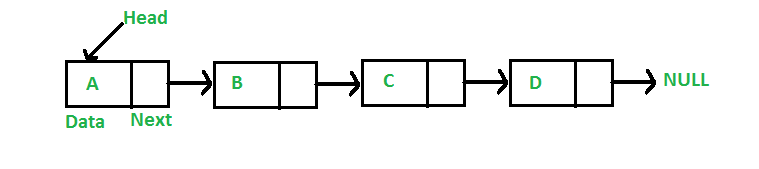
At its core, a linked list is a collection of nodes where each node contains a data part and a reference to the next node in the sequence. This structure allows for a flexible and efficient manner to organize data, particularly when compared to traditional arrays.
Creating a Node Class in Python
To begin our journey into the realm of linked lists, we first need to establish a Node class, which will act as the blueprint for creating individual nodes within our list. Let's start by defining this class in Python:
class Node:
    def __init__(self, data=0, next=None):
        self.data = data
        self.next = next
In the above snippet:
With the basic building block in place, we can now move on to create a LinkedList class that will incorporate various operations such as inserting and deleting nodes, traversing the list, and several other functionalities that we will explore in the upcoming sections.
Stay tuned as we delve deeper into the operations on linked lists in the next section, where we will be enhancing our LinkedList class with methods that facilitate the manipulation of data in an efficient manner.
As we venture further, it’s time to expand our LinkedList class by incorporating fundamental operations that allow us to manipulate and interact with the linked list. These operations are vital in managing the data stored within the nodes effectively. In this section, we will cover the insertion and deletion of nodes, supplemented with Python examples for a better understanding.
Inserting Elements
Before we can insert elements into our linked list, let’s first set up our LinkedList class:
class LinkedList:

    def __init__(self):
        self.head = None

    def insert(self, data):
        new_node = Node(data)
        new_node.next = self.head
        self.head = new_node

    def display(self):
        current = self.head
        while current:
            print(current.data)
            current = current.next
In the above code snippet:
Let’s see how we can use this method to insert elements into our list:
my_list = LinkedList()
my_list.insert(5)
my_list.insert(3)
my_list.insert(1)

my_list.display()

# Output:
# 1 3 5
Deleting Elements
Deleting nodes from a linked list is a straightforward operation. Here, we’ll introduce a method to remove nodes based on their data value:
class LinkedList:
    # ... (existing methods remain unchanged)

    def delete(self, data):
        current = self.head
        previous = None
        while current:
            if current.data == data:
                if previous:
                    previous.next = current.next
                else:
                    self.head = current.next
                return
            previous = current
            current = current.next
In this Python snippet:
Here is how the delete operation works:
my_list.delete(3)

my_list.display()

# Output:
# 1 5
We have now equipped our LinkedList class with basic operations, setting the stage for diving into more advanced operations in the upcoming section. Get ready as we explore more about the interesting concept of linked lists!
As we progress in our journey, we encounter more complex operations that can be performed on linked lists. These operations are not only interesting but also commonly seen in coding interviews and real-world applications. In this section, we will demonstrate how to implement two such advanced operations: finding the Kth element from the end and determining if a linked list is a palindrome, both using Python.
Finding the k_th Element from the End
Finding the k_th element from the end of a linked list is a popular question in technical interviews. Here, we will approach this problem using a two-pointer technique. Let’s implement this method in our LinkedList class:
class LinkedList:
    # ... (existing methods remain unchanged)

    def find_kth_from_end(self, k):
        slow, fast = self.head, self.head
        for _ in range(k):
            if fast:
                fast = fast.next
            else:
                return None
        while fast:
            slow = slow.next
            fast = fast.next
        return slow.data
We can test this method as shown below:
my_list = LinkedList()
my_list.insert(5)
my_list.insert(3)
my_list.insert(1)
print(my_list.find_kth_from_end(2))

# Output:
# 3
Determining if a Linked List is a Palindrome
Another interesting problem is to check whether the elements in a linked list form a palindrome. We can solve this by reversing the second half of the list and comparing it with the first half. Here is how we can implement this:
class LinkedList:
    # ... (existing methods remain unchanged)

    def is_palindrome(self):
        slow, fast = self.head, self.head
        stack = []
        while fast and fast.next:
            stack.append(slow.data)
            slow = slow.next
            fast = fast.next.next
        if fast:
            slow = slow.next
        while slow:
            if slow.data != stack.pop():
                return False
            slow = slow.next
        return True
Let’s verify our method with a Python example:
my_list = LinkedList()
my_list.insert(2)
my_list.insert(1)
my_list.insert(2)
print(my_list.is_palindrome())

# Output:
# True
Through this section, we’ve further enhanced our LinkedList class with advanced operations, adding depth to our understanding of linked lists. Now we will explore another captivating topic in the next section.
In this section, we venture into another challenging yet interesting problem — identifying the intersection point of two linked lists. This is a common interview question and an essential operation to understand when working with linked lists. Let’s proceed to implement a method that helps us find this intersection point in Python.
The Problem Statement
Given two linked lists, the task is to find the node where the lists intersect. It is important to note that the intersection is based on reference, not on the value.
Implementing the Solution
To solve this, we can use two pointers to traverse both lists simultaneously. When one pointer reaches the end, it can be moved to the start of the other list, ensuring that both pointers meet at the intersection point. Here’s how we can implement this in our LinkedList class:
class LinkedList:
    # ... (existing methods remain unchanged)

def find_intersection(list1, list2):
    nodes_set = set()

    current = list1.head
    while current:
        nodes_set.add(current)
        current = current.next

    current = list2.head
    while current:
        if current in nodes_set:
            return current
        current = current.next

    return None
Testing the method with a Python example:
intersection_node = Node(7)
list1 = LinkedList()
list1.insert(5)
list1.insert(3)
list1.insert(1)
list1.head.next.next.next = intersection_node

list2 = LinkedList()
list2.insert(4)
list2.insert(2)
list2.head.next.next = intersection_node

# Kesişim düğümünü buluyoruz
intersect_node = find_intersection(list1, list2)
if intersect_node:
    print(f"Intersection Node: {intersect_node.data}")
else:
    print("No Intersection Node.")

# Output:
# Intersection Node: 7
After acquainting ourselves with various operations on linked lists, let’s shift our focus to some tips and best practices that can aid in efficient and effective coding with linked lists.
As we reach the end of our linked list journey, we hope that you find yourself more comfortable and knowledgeable in handling linked lists with Python. Throughout this guide, we’ve navigated through the basic and advanced operations that linked lists have to offer, providing Python examples to solidify your understanding.
Remember, the key to mastering linked lists is consistent practice and application in real coding scenarios. We encourage you to explore further and possibly find new and efficient ways to implement and use linked lists in your projects.
Thank you for joining us on this enlightening journey, and we look forward to bringing you more engaging content in the future. See you in the next articles. If you have any questions or want to contact me, all my social media accounts are on the link below.
You can also follow my other blog posts on my website below.
<hr><p>Unraveling Linked Lists: From Basics to Advanced Operations was originally published in Dev Genius on Medium, where people are continuing the conversation by highlighting and responding to this story.</p>